Guitar
HomeChange instrument
Tap or strum to play. Start with low media volume. If silent, check volume and output; on iPhone, try Silent Mode off.
Loading guitar…
Loading interactive guitar…
MUSICIAN / PLAY ALONG
Guitar
Right-handed view · thin high E on top · frets increase toward the body →
Fretboard & finger positions
1 · Left handFret the gold markers · nut / open ← → body
2 · Right handBrush ↓ down or ↑ up
Your chord buttons
Chord tray help
Tap to play. Edit to move/remove. Add any selected library shape. Tray resets on reload; saved shortcuts stay separate.
Auto-strum your selected chord
One repeating 4/4 bar. Each slot is half a beat. Changing chord or playing manually stops this loop.
Edit eight-step pattern
Tap your own rhythm
Choose BPM, then Capture taps. First tap starts a four-beat bar. Tap/click the pad or press Space on it; taps snap to the nearest half beat. Finish to use the pattern. No microphone or audio recording.
Interactive guitar is loading. Chord instructions below remain readable.
Tap a string or fret to explore a note.
Sound starts only after you play or test it. Begin with low device volume.
Sound help & test
Boost available up to 250%. Turn speaker volume down before boosting. This changes guitar sound only.
Computer-key shortcuts & setup
Click or Tab into this play area, then press A–G to play matching chords. Use arrow keys to strum again. No Enable step required.
Save to keep your guitar shortcuts on this browser.
Each assigned letter plays once and selects the chord for the arrow keys. Touch string pads below always pick individual strings.
Free play · 48 chord names / 64 shapes
Loading the full chord library. Four starter shapes remain readable below.
Current chord chart
Conventional upright chart · low E on the left, high E on the right. Numbers inside dots are fingers; numbers beside the grid are frets.
Your guitar · pick or strum
Tap a fret to pick its exact note. Drag to scroll the neck.
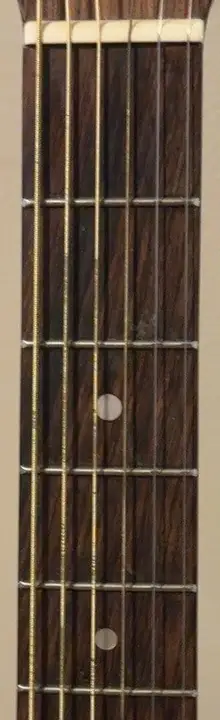
Upright front view · nut at the top; low E on the left, high E on the right. This is a different view from the horizontal player-view diagram above.
This photo shows only frets 1–5. Scroll inside the photo to explore them.
Guided practice · arrangement & tempo
Practice shortcut pads · These belong to the guided exercise, not your custom chord buttons.
- G
- Em
- C
- D
- G
- Em
- C
- D
G → Em → C → D. Keep the pulse steady while changing shapes.
Four beats per bar, eight bars, then a clean finish. Synthesized plucked tones, not a guitar recording or a commercial song. Pause resumes the current beat; tempo and sound changes pause playback.
How to read this guitar & current fingering
Small screen: the strum body sits below the neck. Swipe the fretboard sideways for more frets; note targets stay full size.
1 index · 2 middle · 3 ring · 4 little finger. O open · X skip · gold line = one finger holding a barre. Place fingertips just behind the fret wire, toward the nut.
Standard tuning, low to high: E A D G B E · no capo · A4 = 440 Hz. This player-view layout keeps the neck to your left and the body to your right. It does not mirror the pitches.
Tap any fret to hear its note and see it light up. Gold circles show chord fingers; the vertical gold line means one index finger holds a barre across the strings. O = open string; X = do not strum. Finger numbers: 1 index, 2 middle, 3 ring, 4 little finger. Computer keys: Tab to a note, Left / Right moves along the frets, Up / Down changes strings, Enter or Space plays. Other note names appear when focused or played. Sound off keeps visual feedback.
Tap a chord pad to play it. Brush down or up across the body strings with a finger or pressed mouse; each crossed string rings. Tap one string to pick it. X strings stay silent. Computer keys: Tab to a string or chord, then Enter or Space. Up / Down changes strings. Escape or Damp strings stops sound without changing your chord.
Fret 1 is nearest the nut. Put your fingertip just behind the fret wire, not on it. Fingerings are one common option, not the only way. A higher fret window separates its open-string column from the fretted neck.
Chord shapes, sources & playback limits
16 common open shapes plus four movable E-family shapes transposed to all 12 roots. Barres use one index finger across strings 6–1, not several index fingers. They are intermediate shapes; high-fret access varies by guitar. The board follows the selected fret position. A sharp and its equivalent flat sound the same here; note labels use sharps. Major 7th, suspended, diminished, alternate tunings and capo shapes are not included.
Read these shapes from low E to high E. X means omit the string, 0 means open; other numbers are frets.
- G: 3–2–0–0–0–3. Middle finger on low E fret 3, index on A fret 2, ring on high E fret 3. Strum all six.
- Em: 0–2–2–0–0–0. Middle finger on A fret 2, ring on D fret 2. Strum all six.
- C: X–3–2–0–1–0. Ring finger on A fret 3, middle on D fret 2, index on B fret 1. Omit low E.
- D: X–X–0–2–3–2. Index finger on G fret 2, ring on B fret 3, middle on high E fret 2. Omit low E and A.
Starter fingering references: Fender G (external), Fender Em (external), Gibson C (external), Gibson D (external).
Expanded shape references checked 25 October 2026: Fender A / movable major (external), Fender E (external), Fender Am (external), Fender E7 (external), Fender Dm (external), Fender B7 (external), Fender C7 (external), Fender D7 (external), Fender A7 (external), Fender G7 (external), Fender Am7 (external), Fender Em7 (external), MuseScore movable shape / root chart (external), JustinGuitar barre lessons (external). Transpositions are calculated locally from standard tuning, not copied song charts. The common open C7 omits the fifth (G); its E-family barre includes it. Fingering guidance is one practical option, not an assessment of your playing.
Starts only after you use Play, a chord pad, a string, a note or Test sound. Both the horizontal fretboard and body show high E at the top and low E at the bottom. This is a right-handed player-view diagram, not a mirrored front view or an exact photographic projection. On narrow screens the strum body moves below the neck; the fretboard scrolls locally rather than shrinking its note targets. Synthesized tones are a lightweight practice aid, not sampled acoustic-guitar sound. The test sends an A4 tone and turns Sound on. If it stays silent, check this tab is not muted and your selected speaker or headphone output. The page cannot detect whether you hear the tone. Turn your device volume down before first use. Playback pauses when this tab is hidden, you leave the page, or start the separate metronome. Visual timing can lag sound on busy devices. No microphone, recording, upload, saved practice settings or embedded player. YouTube links in the setlist remain references only; this tool does not detect or follow chords from a song link.