Clayface
Horror / thriller · 108 min · Cinema release:
A rising actor becomes a vengeful monster in a horror story about identity and dangerous scientific ambition.
Ontario 14A: Gory violence

Choose a listed location, or search after the page loads.
Weather locations only. Tap a full city name; Enter focuses results.
Search stays in your browser. The first option clears your saved weather city and returns to the Toronto default.
Your browser may use its own location service. After you confirm the suggested city, your estimated position and accuracy are shown on this page only. The street map centres on it when inside the available map area, sending requests for that area and your network address to OpenFreeMap. Coordinates are not saved. Forecasts still use the named city centre.
Toronto is the default until you choose a weather city.
Loading saved weather city or Toronto default.
Choose a weather location above.
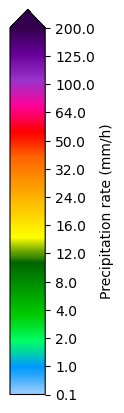
Radar shows detected precipitation, not clouds. Coverage and source delays vary.
Open imagery and choose a city to load the latest available source image.
Blue dot: selected city centre, not your location. Gold dot after Locate Me: your device estimate; its circle shows reported accuracy. Two fingers to move/zoom · +/− zoom. Mouse drag or arrow keys pan; Ctrl/⌘ + scroll zooms. Weather stays a 1 km grid.
Times use the selected city’s time zone when available; otherwise UTC. These are observed source images, not future radar or a wind layer. Map zoom does not add finer weather detail.
Official ECCC source colour scale. Blue is low rain rate, not snow.
Gray: outside radar coverage. No detected echo does not guarantee dry weather.
Observed rain-rate imagery, not a precipitation-type or future forecast layer.
ECCC data source & licence ↗Paused. Imagery loads only when opened.
Source details appear with available imagery.
Source & attribution ↗Frames are captured at the times shown, not a continuous camera feed. Playing repeats only the available frames; it does not predict future movement.
Map: OpenFreeMap · © OpenMapTiles · © OpenStreetMap. Street and place labels stay above observed weather. Clouds are an observed GOES visible/infrared product, not satellite-photo streets. If interactive mapping fails, the static fallback uses Natural Earth and GeoNames under CC BY 4.0.
OpenFreeMap and its CDN (Cloudflare) can process your IP address and the map area you view, including CDN error reports. No account or key is needed. Locate Me uses your browser’s permission to show an estimated device position and centre the map when inside its area. That map area and your network address are shared with OpenFreeMap; coordinates are not saved. Forecasts remain for the selected city. Map privacy · Map terms · MapLibre licence · Third-party notices. Weather pixels stay on a fixed public-city extent; panning does not request new weather images. Official weather and alerts ↗
Reduced motion is on. Use the frame slider for still images, or choose Play to opt in.
Explore useful tools and new features.
Your local list will appear here when ready.
Across browsers, based on recorded section opens in the last 30 days—not unique visitors or all traffic.
Shared totals have not loaded. Popularity is unknown.
FOLLOW YOUR MOOD
Choose a service to visit, or pin it to your shortcuts. Each opens its own website.
Source-checked · Canada · Ontario ratings
Listed by Landmark when checked, not live showtimes. Choose a cinema to confirm local screenings. Links open in new tabs.
4 films
Horror / thriller · 108 min · Cinema release:
A rising actor becomes a vengeful monster in a horror story about identity and dangerous scientific ambition.
Ontario 14A: Gory violence
Animation / adventure · 132 min · Cinema release:
Prue enters a hidden forest to rescue her baby brother, discovering talking animals and a conflict that threatens their world.
Ontario PG: Violence, May frighten young children
Drama · 117 min · Cinema release:
An artificial companion joins a teenager's household, bringing curiosity and loyalty to a family shaped by loss.
Ontario PG: Violence, Coarse language
Action / adventure · 119 min · Cinema release:
Chun-Li recruits estranged fighters Ryu and Ken for a tournament, where a conspiracy turns their reunion into a dangerous rivalry.
Ontario PG: Violence, Coarse Language
Canadian cinema listings ↗ · Official-source video links; playback was not tested. Wildwood’s upload was checked in search metadata. Dates and cinema availability can change.
No matches yet. Try a topic such as weather, pets, news or paint, or clear your search.
Services have their own accounts, subscriptions, availability and privacy terms. SubeR doesn’t play their media or control their apps. No service is connected to SubeR.
WELCOME TO SubeR
A homepage shaped around you. Bring your favourites together, then choose the colours and layout that feel right.
Choose your colours and layout. Preview before saving, only in this browser.
SubeR ORIGINALS
Four free games. No timers, accounts or downloads.
Console games? Open controller guides & tips →
Find three numbers. Make the target.
Play →Slide eight tiles into order.
Play →Light the garden, one ripple at a time.
Play →Flip two cards and find their matching shapes. No scores leave this page.
Choose two cards. If they don’t match, take your time, then choose Turn cards back. Keyboard: Tab or arrow keys to move; Enter or Space to flip.
0 moves · 0 of 6 pairs
Solo · touch or keyboard · no timer, ads or account. Progress lasts for this visit only.
Explore shows and keep your favourites together. Customize the podcast library with choices saved on this device.
Search and choose podcasts →Save your own playlists or ones you love from Spotify, Apple Music, YouTube Music and other services.
Copy a playlist’s Share link, paste it here and give it a name. Your button opens that playlist in its music service; press Play there. Sign-in or a subscription may be needed.
Spotify Liked Songs belongs to your signed-in account. Save a playlist’s share link to open a specific collection. SubeR does not import your library or publish your links.
PICK UP WHERE YOU WANT
Saved in this browser when you add one. No connections or account access.
No saved shortcuts match this search.
Add a favourite playlist, a channel, an app or a site. Give it a name and make it yours.
Shed & Yard Planner → Try a layout in your own photo. No photo upload.
Useful calculators, planners & AI helpers.
19 tools
 Unit price comparisonShopping
 Flooring & tile estimatorHome projects
 Paint quantity estimatorHome projects
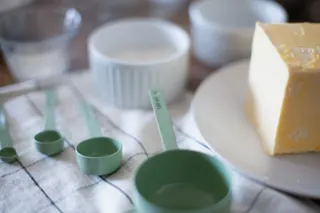 Recipe scalerKitchen
 Split a billEveryday
 Sale price calculatorShopping
 Time between two timesEveryday
 Everyday unit converterEveryday
 AI prompt builderAI helpers
 Trip fuel & shared costsTravel
 Calendar day plannerEveryday
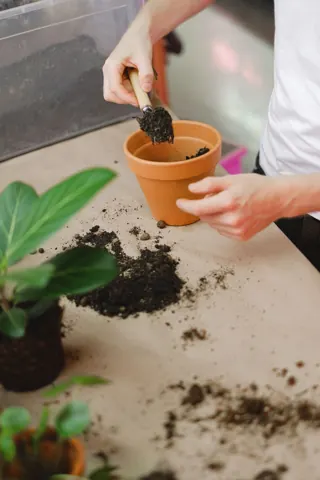 Soil & mulch estimatorHome projects
 Appliance energy costHome projects
 Text tidy & word countEveryday
 Percentage calculatorShopping
No matching tools. Try another word or clear your search.
PLAY IN SubeR
Choose from four free games, including Pair Pause and Lantern Loop.
Choose a game
SubeR LOCAL
Find places to go, salons and spas, and help for home and yard. Choose your area, compare service details and contact businesses directly.
Explore SubeR LocalFriends, live chat and a familiar place to hang out are part of the plan.
There’s no messaging, friend list or online status in this version. Account security, private conversations and clear sharing choices need to work before people can use them.
For now, make yourself at home with your own shortcuts.
Back to my spacePLAIN AND SIMPLE
Your shortcuts and appearance choices can stay on this device. Anyone using this browser profile may see them.
Don’t save passwords or access tokens in shortcut links.
Shortcut names, icons, categories and links use this browser’s local storage. They aren’t synced to an account or sent to a SubeR shortcut server.
Colour and layout preferences also stay here. Old background-photo records are no longer read or displayed, and are not deleted by this change. Browser storage is best effort and may be cleared.
This is not a password-protected vault. Don’t add links containing passwords, access tokens or other secrets.
Reset removes your shortcuts and their saving preference. It can’t be undone; other SubeR tools are unchanged.
A link opens the named service in a new tab. Its privacy terms apply. Your shortcut list is not sent with it.
Google, ChatGPT and Perplexity receive your words only when you press Enter or Search, and open in a new tab. Gemini opens without your prompt; copy it, then paste and send there. Each service’s terms and privacy policy apply. OpenAI owns the ChatGPT name and mark. No endorsement implied.
The destination receives a normal website visit. SubeR does not connect to your account there.
This homepage has no embedded players, remote favicons or third-party analytics scripts. It loads SubeR’s files and requests public weather through SubeR. When the weather map is active, it also loads map resources from OpenFreeMap; the map privacy notice explains this provider’s data use. Your chosen weather city is saved in this browser. Device location is optional: it is requested only after you choose the weather location control and is subject to your browser’s permission. The hosting service still handles normal website requests.
The personal Most visited list stays in this browser and does not read browser history. Separate optional Popular on SubeR totals use only fixed section IDs sent to SubeR’s own server, not visitor IDs, cookies, page URLs, search text, location or tool inputs. Shared contribution controls are separate from the personal list’s Pause and Clear & pause. Section-count scope, limits and privacy.
Local and Food keep their existing features and privacy explanations. Their saved favourites, shopping lists and trip stops are separate from these shortcuts.
Independent links to third-party services. Discord marks belong to Discord Inc. No affiliation or endorsement is implied. Home photo credits · Local photo credits · Tool photo credits.