Learn here. Identify with Merlin. No microphone access or bird recognition on SubeR.
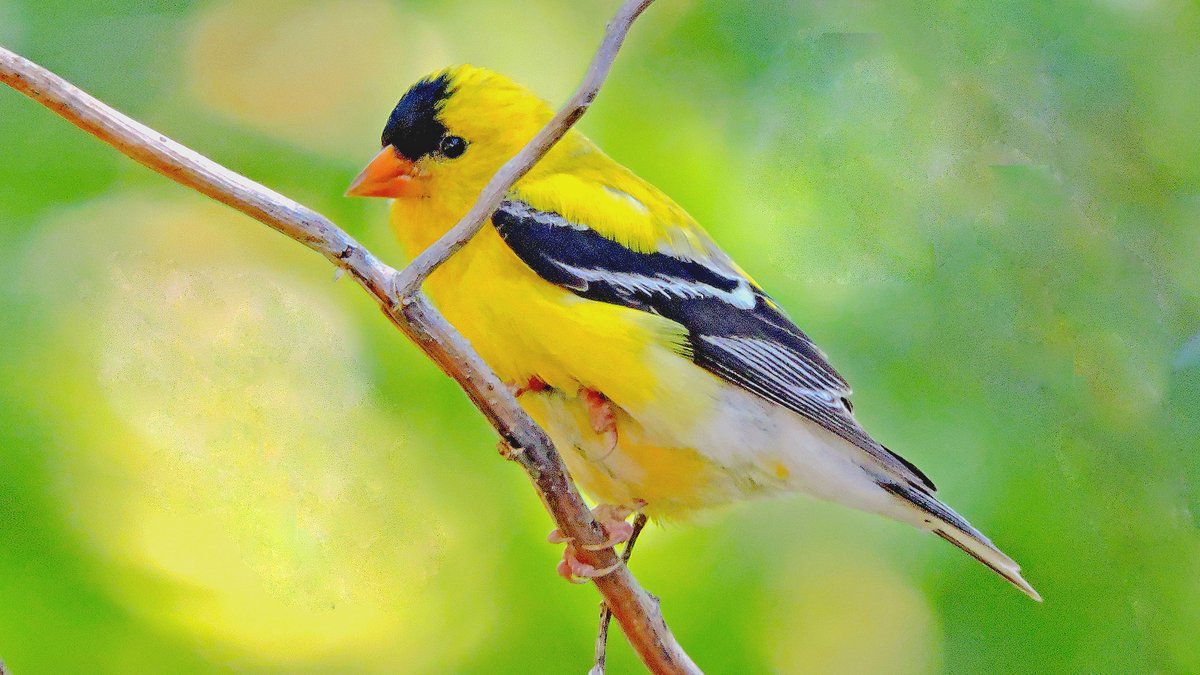
Look for more than a colour.Notice the short, pointed bill, black cap and pale wing markings. This male’s bright summer plumage is one example, not a year-round identification rule.Illustrative photograph, not a local sighting. Portland, Oregon, July 2014. Photo credit
YOUR BIRDSONG COMPANION
Meet Merlin Bird ID.
Merlin is a separate app from the Cornell Lab of Ornithology. Its Sound ID can suggest birds from sounds you record in Merlin. Treat those suggestions as clues, not a confirmed identification.
Merlin is free. Set up your own email/account and app permissions in Merlin. No credit card is needed for Merlin. SubeR does not install it, sign you in or send it your notes.
Already installed? Open Merlin on your phone and choose Sound ID. These links do not start recording.
THREE SMALL STEPS
Listen first. Learn as you go.
You do not need to know a bird’s name to enjoy noticing it.
01 / BEFORE YOU GO
Get ready at home.
Install Merlin and finish its setup while connected. Download the relevant bird information in the app before relying on it offline.
Check what is available for your region and device in Merlin. Bring a charged phone and choose a safe place to stop.
02 / OUTSIDE, IN MERLIN
Give the sound some space.
Open Sound ID in Merlin. Stay still and quiet, keep your phone’s microphone uncovered, and follow the recording controls in the app.
Wind, traffic and talking can make suggestions less useful. Listen from a safe spot; do not move closer to a nest for a recording.
03 / FOLLOW THE CLUES
Check the whole picture.
Compare a suggestion with what you can see and hear: size, shape, markings, habitat and season. A name on a screen is only a starting point.
If the clues do not fit, leave the identification uncertain. “Not sure” is a good observation too.
Original SubeR teaching illustrations, not Merlin screenshots or app controls.
MEET A FEW FAMILIAR BIRDS
Six birds. A few memorable clues.
A starting set for southern Ontario birdwatchers—not a complete local list or live sightings feed. Season, age and habitat matter. Follow the Cornell guides for real photographs, range maps and sounds.
American Robin
Watch the ground, then the trees.
Look for an orange breast and a bird foraging on lawns. In winter, robins may gather near fruiting trees rather than the lawn.
One thing to remember: A winter robin is not necessarily an early arrival: some remain within their breeding range through winter.
Optional and yours. These fields stay on this page unless you explicitly save a sighting in the browser-only journal below. Nothing is sent to SubeR or a reporting service. Your browser may restore this page’s state through Back or session recovery. Copy a note to keep it elsewhere.
Nothing entered is a confirmed identification.
Your note · unverified
YOUR BROWSER-ONLY SIGHTING JOURNAL
Keep the moments you notice.
Nothing is saved until you choose Save sighting or Import backup. Saved entries stay in this browser on this device; they are not sent to SubeR or a bird-reporting service. Storage is not encrypted or protected from other people using a shared browser, or other scripts on this site. Avoid home addresses, exact nest/roost locations and personal details, including in clues.
Clearing site data or using private browsing can remove entries. Keep your own backup. Maximum 250 entries. This is an unverified personal journal, not an eBird checklist or scientific submission.
JavaScript is needed for the local journal.
TURN AN OBSERVATION INTO A CONTRIBUTION
Ready to report a sighting?
Your SubeR note and journal are not sent anywhere. To contribute observations to research, choose an official service and submit them yourself there. A Merlin suggestion is not a confirmed identification.
eBird & eBird Canada
Record birds you see or hear using eBird’s website or app. eBird Canada is a free program managed by Birds Canada with Cornell Lab and QuébecOiseaux.
Before reporting, check your identification and count, observation date, time and duration. Follow eBird’s instructions for the location and checklist type; a SubeR note is not a complete checklist.
Want a shared reason to get outside? Birds Canada’s free February count welcomes all experience levels, from a window, park or favourite birding spot.
Watch for at least 15 minutes during the official count period and follow the program’s current instructions for reporting through Merlin or eBird. Check the official page for this year’s dates.
eBird checklists include location coordinates that can appear in public outputs. Review the service’s privacy options before submitting, especially for a home location. Do not publish precise nest, roost or sensitive-species locations in public notes or social posts. Follow eBird’s sensitive-species guidance; not every vulnerable situation is automatically hidden.
Links open a separate service in a new tab. SubeR does not create accounts, fill forms, transmit your journal, or submit reports for you. Reporting sources checked 25 October 2026.
CLEAR BOUNDARIES
A guide, not a listening device.
SubeR does not access your microphone or location, record audio, recognize birds, embed Merlin or upload your observation. The optional journal stores only what you explicitly save in this browser; no account or cloud sync. Sound ID and its permissions are handled only in Merlin. External links open new tabs when you choose them; their own terms and privacy practices apply.
Your existing SubeR appearance and shared weather/bookmark bars remain separate. The weather bar requests forecasts from SubeR using your saved weather location, or Toronto by default, not your observation. Shared weather preferences and a temporary forecast cache use browser storage. Bookmarks read your saved SubeR shortcuts. The host still handles normal page requests.